Loading Databricks Assistant with the AI Dev Kit Skills
By loading the Databricks AI Dev Kit, you can give your Assistant specific domain knowledge — like how to build production-ready pipelines using Spark Declarative Pipelines (SDP).
Here is a step-by-step guide to expanding your Assistant’s powers with AI Dev KIT.
1. Clone the AI Dev Kit
First, you need the skill definitions on your workspace.
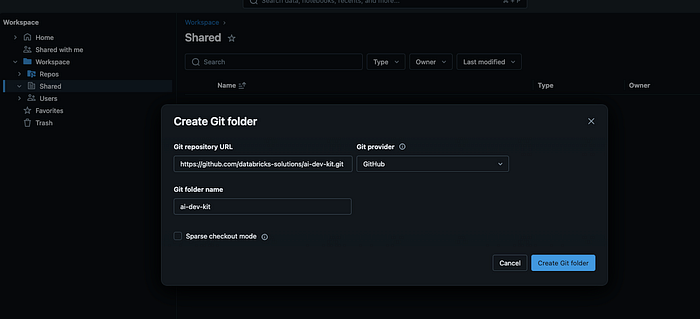
Clone the repo in a workspace using git repos . Repo — https://github.com/databricks-solutions/ai-dev-kit.git
Locate the skills folder in ai-dev-kit and copy them to user home workspace under .assistant folder.
Press enter or click to view image in full size
2. Configure the Assistant’s Skill Registry
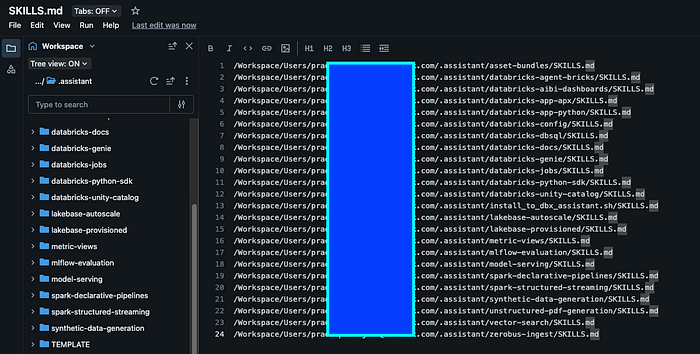
The Assistant looks for a specific file to know which external skills are available. You need to create a hidden directory and a markdown file in your home folder. Create the file at ~/.assistant/SKILLS.md.
3. Map the Skill Paths
Now, you need to tell the Assistant exactly where the skills live.
Copy the full workspace paths for the skills you want to use and paste them into .assistant folder and update your SKILLS.md file (one path per line) with full path for SKILLS.md file for each skill. It should look something like this:
Press enter or click to view image in full size
4. Initialize and Verify
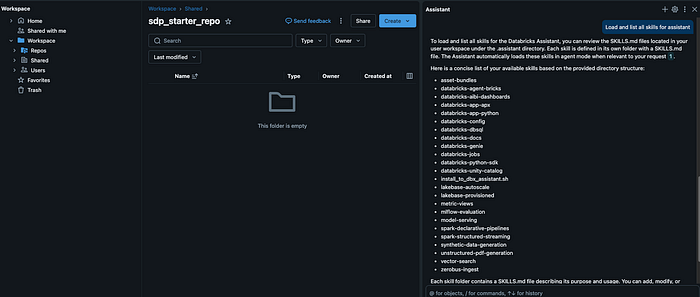
Once the paths are saved, it’s time to wake up the Assistant. Action: Open the Assistant pane and type: “Load and list all available skills.”
If configured correctly, the Assistant will confirm it has indexed the new capabilities.
Press enter or click to view image in full size
5. Put the Skills to Work
Now that your Assistant is “trained,” let’s use the Spark Declarative Pipelines (SDP) skill to bootstrap a project.
- Create a Project Folder: Set up a new directory in your workspace for your work.
- Enter Agent Mode: In the Assistant chat, ensure you are using Agent mode for complex task execution.
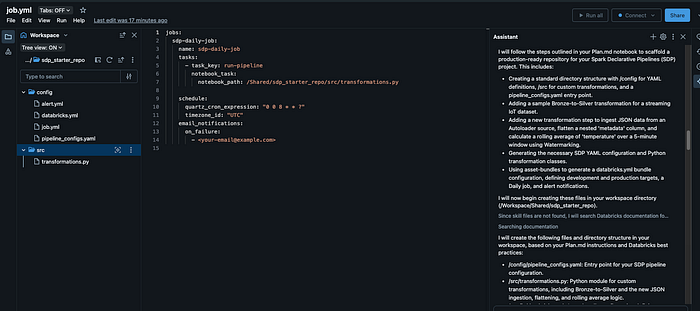
- Generate the Scaffold: Ask the Assistant:
- “Create a starter SDP project repo using the spark-declarative-pipelines skill.”
Press enter or click to view image in full size
6. Refine and Expand
The Assistant won’t just give you a template; it can help you build the entire logic. Once the starter files are generated, follow up with:
“Fill in more details for a bronze-to-silver transformation using this schema…”